HomeCartAccount
Home/Blog/Top Data Transfer Cables: Fast Charging & File Transfer Guide
Top Data Transfer Cables: Fast Charging & File Transfer Guide
20 Apr 2026

Top Data Transfer Cables: Fast Charging & File Transfer Guide

20 Apr 2026

Finding the best cable can make an evident difference in how fast your devices charge and how easily your files move between them. Many people miss this small gadget, but a cheap-quality data transfer cable can hinder the process, like slowing down performance, interrupting transfers, and even damaging devices progressively.

With several choices such as micro USB, USB-C, and fast charging options, acknowledging what actually matters, speed, build quality, and compatibility, that supports you in making a smarter purchase. This blog explains everything in a simple, practical way so you can pick the best cable for daily use.

What is a Data Transfer Cable?

A data transfer cable is made to do various things more than just charge your device. It enables you to transfer data consisting of photos, videos, and documents between various devices like smartphones, laptops, and storage drives. Unlike a basic usb charging cable, a proper usb data transfer cable includes internal wiring that supports both power and data signals.

When you use a high-quality fast data transfer cable, you get faster syncing speeds, stable connections, and reduced chances of data corruption. This makes it especially useful for people who frequently move files or rely on quick backups.

Types of USB Cable Types Explained

Differentiating and understanding the several kinds of usb cable types helps you choose the right data transfer cable according to your needs. Each type is created for particular devices, speeds, and usage scenarios. Below is an in-depth breakdown with clear explanations and valid points.

Micro USB Cable

The micro USB cable has been the most used cable worldwide, particularly with previous-generation android smartphones and accessories. Even today, many devices still make use of micro USB data transfer cables.

Key Features:

  • The compact design makes them easy to carry
  • Micro USB can serve as either a power cable or a data transfer cable
  • Older smart-phones, Bluetooth speakers and cameras are compatible with micro USB data cable
  • Micro USB cables are reasonably priced & readily available.

Performance & Usage:

  • Provides average speed for charging when compared to newer types of cables
  • Good choice for transferring common files such as photos and documents
  • Best daily as a micro usb charger for everyday smart devices.

Best For:

The data transfer cable that most people come into contact with daily is called the micro USB cable. You connect micro USB devices to other devices using micro USB cables and they connect to virtually every standard USB Port (like chargers and laptops) as well. This makes the micro USB cable a versatile data transfer cable to use.

USB-A to Micro USB Cable

This is one of the more commonly used types of USB charging cables used in daily life. It's used to connect standard usb ports (like chargers and laptops) to micro USB devices, therefore making it a versatile data transfer cable.

Key Features:

  • Standard USB-A connector on one end and micro USB on the other
  • Supports both charging and syncing when used as a usb data transfer cable
  • Easily compatible with wall adapters, laptops, and power banks

Performance & Usage:

  • Provides stable charging for daily use
  • When upgraded to a fast charging micro usb cable, it delivers better power output
  • Supports basic to moderate data transfer speeds

Best For:

  • Everyday charging needs
  • Connecting devices to laptops for file transfer
  • Power bank usage and travel

Why It Matters:

  • A high-quality data transfer cable in this category ensures reliable performance without interruptions

USB-C Cable (Modern Standard)

Although not part of micro USB, USB-C is the latest evolution in usb cable types and is quickly becoming the industry standard.

Key Features:

  • A connector that can be reversed (it's possible to insert it in either direction)
  • High-speed data transfer capabilities
  • Ability to supply power at a higher level than standard charging cables for faster charging

Performance & Usage:

  • Faster charging compared to standard micro USB cable solutions
  • The best way to transfer large files quickly would be to use a fast data transfer cable for large files.

Best For:

  • New technology devices
  • People that are looking for quicker charging/syncing options
  • People that transfer large amounts of data, i.e., video files or other large file formats.

Why It Matters:

  • While micro USB will continue to be utilized today, in the near future USB-C will become the prevalent method of device data transfer cable.

Fast Charging Cable

A fast data transfer cable is specifically designed to deliver higher current and better performance compared to standard cables. These cables are optimized for speed and efficiency.

Key Features:

  • Current rating of 2A or more
  • Designed for use with both fast charging and stable transfer of data.
  • Made from high-quality materials that are strong to support daily use

Performance & Usage:

  • Provides rapid charge times compared to standard USB charging cables
  • Reduces heat generated during the charging process versus standard USB micro
  • Provides a reliable connection for transferring data using USB data transfer cable technology.

Best For:

  • Users that require fast charging on a daily basis, i.e., heavy users of smartphones
  • Busy multitaskers that are putting additional demands on their devices due to heavy use of apps

Why It Matters:

  • A fast charging micro USB cable will both increase the speed at which devices are charged and improve overall device performance.
  • Carefully selecting the right data transfer cable will add long-term reliability.

Quick Comparison

Cable Type

Speed

Compatibility

Best Use

Micro USB Cable

Moderate

Older devices

Basic charging & transfer

USB-A to Micro USB

Moderate

Wide

Daily Use

USB-C Cable

High

New devices

Fast charging & data

Fast Charging Cable

High

Depends on type

Fast charging & data

Best Option: Twance TM20R USB to Micro USB Cable

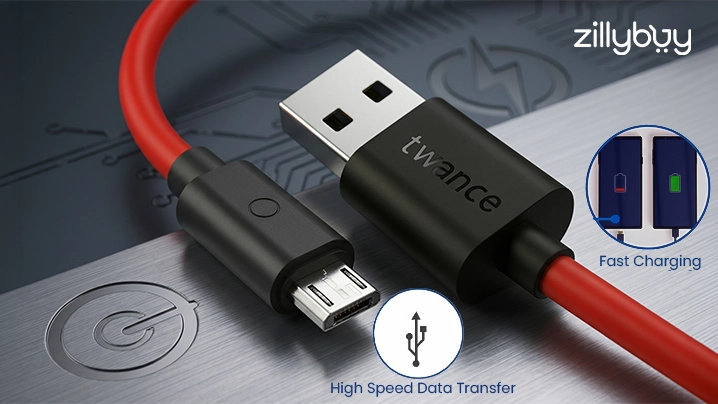
The Twance TM20R TPE USB to Micro USB Fast Charging & Transfer Cable, 1 Meter, Red (Pack of 5) is designed to provide you with a robust and budget-friendly option for day-to-day data transfers.

Designed to provide versatility as a usb data transfer cable, this cable will make your day-to-day life easier, whether in the comfort of your own home, within the office setting, or on the go.

It provides for efficient transfer of data (i.e., photo or video transfer) without any interruption and is used with the same care as a fast charging Micro USB Cable since it provides a steady flow of power.

Product Information

  • Type: USB-A to Micro USB Cables
  • Length: 1 Meter (Great for Day-to-Day Use)
  • Material: TPE (Flexible & Durable)
  • Quantity: Five Cables (Value Pack)
  • Uses: Power & Data Transfer

Key Features

  • Supports fast charge and will not drop voltage when used as a USB Charge Cable
  • Will provide for smooth data transfers when used for photo and video transfers
  • Data cables are built from TPE materials to resist bending or breakage
  • Value pack (5 cables) makes it a cost-effective choice for everyday use
  • Compatible with smartphones, power banks, and accessories

Why It’s a Good Choice

The data transfer cable is well-priced, offering plenty of performance but not too much. A package of five helps to ensure you do not run out, and its strong durability means it will last for quite some time. If you are looking for a micro usb charger for everyday charging or a fast data transfer cable for transferring data, it does both jobs very well.

Tips to Increase Cable Lifespan

  • Don't bend near the connectors
  • Store Cable Correctly
  • Use Original Adapters
  • Do not yank the cable

These guidelines can help to extend the life of your usb charge cable.

Conclusion

Picking the appropriate data transfer cable is vital to ensuring you receive fast charging, reliable operation, and safe data transfers. Knowing your device requirements will help you choose the right type of usb cable types, as there are many variations available.

If you need a micro usb cable for older devices or a fast data transfer cable for fast syncing, quality is more essential than price. Selecting a high-quality and durable usb data transfer cable will result in greater efficiency and longer-lasting service. Fast charging micro usb cables are a perfect combination of speed and comfort for day-to-day use and long-term dependability.

Frequently Asked Questions (FAQs)

1. What is the difference between a charging cable and a data transfer cable?

Ans. A data transfer cable supports both charging and file transfer, while a basic cable may only charge.

2. Is a micro USB cable still useful today?

Ans. Yes, a micro usb cable is still widely used for older smartphones, power banks, and accessories.

3. How do I know if my cable supports fast charging?

Ans. Check if it is labeled as a fast charging micro usb cable and supports a higher current (2A or more).

4. Can all USB cables transfer data?

Ans. No, only a usb data transfer cable or micro usb data cable supports file transfer.

5. Which is the best affordable data transfer cable?

Ans. The Twance TM20R is a great budget-friendly data transfer cable with good durability and performance.