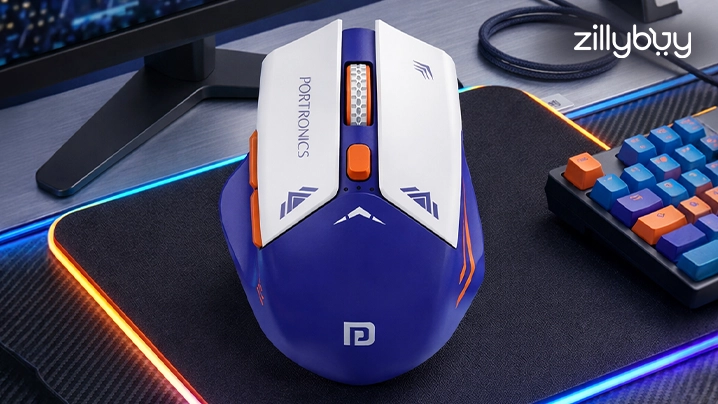
Best Wireless Gaming Mouse in 2026: Top Picks for Pro Gamers & Beginners
In 2026, the landscape of the competitive gaming world has changed entirely toward wireless rule. Those days are gone when "wireless" meant latency or battery issues. Today, a wireless gaming mouse performs many traditional wired alternatives. If you are a professional esports athlete tracking pixel-perfect headshots or a beginner looking to declutter your desk, finding the best gaming mouse is the most efficient upgrade you can make to your PC setup.
At Zillybuy, we understand that your pc gaming mouse is an important extension of your PC. In this blog, we guide you and break down all the top-notch choices for 2026, focusing on ergonomic fatigue reduction, sensor systems, and click latency to help you dominate the leaderboard for beginners and pros.
Why Wireless Technology is Non-Negotiable in 2026
Today's wireless gaming mice utilize their own unique wireless protocols that operate with sub 1ms latency on the 2.4GHz frequency; however, Bluetooth offers great functionality for more general productivity tasks, but a dedicated wireless dongle will allow you to operate free from any type of interference regardless of whether you are in a gaming tournament or an environment with an ample number of available signals.
Performance Key Indicators
We can look at gaming mouse performance in a comparable way to how we might think about the performance from high-performance equipment. Whereas a vehicle’s powertrain will need proper balance in order to yield the best possible performance, the same is true about the gaming mouse.
- HP (DPI/CPI): The amount of maximum mouse sensitivity (DPI) that allows the user to navigate smoothly along a 4K monitor.
- Torque (Acceleration): The ability of a sensor to track sudden bursts of speed so that the mouse will not overshoot or miss the marked target.
- Powertrain (Sensor Type): The optical engine will convert the physical movement into digital data.
- Wheel (Scrolling Encoder): The mechanical or non-mechanical scrolling system for switching with regard to weapons.
Wired vs Wireless Gaming Mouse
Feature
Wired Mouse
Wireless Mouse
Latency
Slightly Lower
Nearly identical
Mobility
Limited
High
Setup
Plug & Play
Requires charging
Performance
Stable
Advanced and evolving
How to Choose the Best Wireless Gaming Mouse
Sensor Quality
The sensor that is used to track movement and detect accuracy makes up what a gaming mouse precision is like, so you want to go with something like an optical sensor (PixArt, HERO), so if you want smooth, precise movements, then optical sensors are what you want to use.
- 800–1600 DPI: Most Gamers will find this range works well for their gaming needs.
- Higher DPI: It enables accessing a faster cursor. This isn't always going to be a good thing depending on how you use your mouse.
Tip: A high-quality sensor will give you better accuracy, no lag, and no skipping with your cursor, which leads to better aim.
Weight
Speed or Control of our mouse provide is affected by weight.
- 60–80g light mouse for FPS gaming (Quick movements)
- 80–100g average mouse for average gaming
- 100g + heavy mouse for strategy/MMO gaming
Tip: The lighter the mouse, the faster your response time, while a heavier mouse gives you a stable feel under your hand.
Battery Life
You want your battery to last through gaming sessions without having to stop or restart.
- Minimum of 40 hours would be acceptable.
- 70 hours or more would be ideal.
Tip: The longer the mouse can last on a single charge without interruptions, the better.
Grip Style
The way you grip your mouse will help improve overall comfort and performance during gaming sessions.
- Palm Grip: Full hand contact for larger ergonomic mice
- Claw Grip: Middle of your hand on your mouse for medium-sized mice
- Fingertip Grip: Only fingers on mouse for small, lightweight mice
Tip: Finding the right grip will help improve your performance and reduce any strain on your hands and fingers.
The best mouse for you is determined by how comfortable it is and how well it fits your hand, not necessarily by the number of specs that the mouse has in its design.
Top Picks at Zillybuy: In-Depth Product Analysis
Portronics Vader Pro
While primarily acknowledged as a reasonable wireless controller, the Vader Pro wireless gaming mouse showcases what users expect from wireless devices: dual-mode connectivity and zero-lag response.
- Battery Life: It can last up to 80 hours of continuous "driving" on a full single charge.
- Horsepower: High-precision analog triggers and tactile buttons.
- Drive: It is 2.4 GHz Wireless with Bluetooth 5.0.
- Features: Dual vibration motors for haptic feedback and a Turbo mode for rapid-fire inputs.
- Pros: Ergonomic "racing" grip that gives multi-platform compatibility (PC/Switch/Android).
- Cons: It has a larger footprint than a standard mouse that generally requires thumb-stick mastery.
Portronics Toad 27
For the beginner or the "stealth" gamer, the Toad 27 offers the best value in the wireless gaming mouse options. It is designed for those who need a reliable tool for work and playat.
- Powertrain: Advanced Optical Sensor with adjustable 1200 DPI.
- Torque: Optimized for smooth gliding on both cloth and hard pads.
- Wheel Type: High-grip rubberized scroll wheel for precision cycling.
- Usage: Best for RPGs, MOBAs, and office productivity where silent clicks are preferred.
- Pros: 2.4GHz lag-free connection; silent click technology; ultra-lightweight.
- Cons: Not ideal for ultra-high-speed competitive FPS (first-person shooters).
Portronics Toad II
The Portronics Toad II is a refined gaming computer mouse that focuses on "fuel efficiency" and long-term comfort.
- Horsepower: 1200 DPI resolution.
- EPA-Estimated MPG: Low power consumption design with smart sleep mode.
- Drive: Plug-and-play USB Nano receiver.
- Structure: Hand-contoured design that mimics the cockpit of a luxury vehicle.
- Pros: Highly affordable; durable build quality; consistent tracking on various surfaces.
- Cons: Fixed DPI settings might limit professional-level customization.
Portronics Toadgo
If you hate swapping AA batteries, the Toadgo is the best gaming mouse for eco-conscious users who demand a rechargeable "powertrain."
- EPA-Estimated MPG: Toadgo has a rechargeable internal battery with Type-C charging.
- Powertrain: Attain a 2.4 GHz Wireless engine.
- Drive: Smooth connectivity up to 10 meters' distance.
- Usage: Ideal for laptop gaming setups and minimalist desk aesthetics.
- Pros: No external batteries needed; sleek aesthetic; responsive click-feel.
- Cons: Generally for players who prefer heavy "torque" in their movements, while it has a lightweight frame, it may feel too "flighty."
Comparison Table
Model
Primary Use
Connectivity
Battery Style
Best Feature
Vader Pro
Competitive/Console
2.4GHz/BT
Rechargeable
Turbo Mode & Haptics
Toad 27
Casual/Office
2.4GHz
Battery
Silent Clicks
Toad II
Beginner Gaming
2.4GHz
Battery
Ergonomic Grip
Toadgo
Travel/Laptop
2.4GHz
USB-C Rechargeable
Ultra-Portability
Final Verdict
When searching for the right wireless gaming mouse, it's crucial to think about personal preferences. The Portronics brand is an affordable and dependable choice for beginners, while the Toad II is a great option for intermediate-level players due to its combination of affordability and functionality. However, if you're a serious competitive gamer, premium mice with advanced sensors and extremely low latency should be your first choice.
When choosing the right mouse to play video games, it is not only about specifications; it is also about comfort, control, and consistency in usage.
Frequently Asked Questions (FAQs)
1. What is a good beginner's wireless gaming mouse?
For beginners, the Wiregaming Mouse by Portronics is a solid choice because it's inexpensive and easy to use.
2. Are wireless gaming mice good for FPS?
Modern wireless gaming mice have almost zero delay, which makes them suitable for first-person shooter (FPS) games.
3. For gaming, how much DPI should I use?
Ans. Most gamers will be satisfied with using anywhere between 800-1600 dpi when they play games, but competitive gamers may want to consider using a mouse that has more than just 800-1600 DPI.
4. How long do batteries in wireless gaming mice last?
Ans. Depending upon a variety of factors, including how often you use it, many wireless gaming mice will last 40-100 hours before needing a new battery.
5. Are gaming mice better than standard mice?
Ans. Gaming mice provide higher levels of accuracy and much quicker response times than standard computer mice as well as customizable functions.